


You spend hours creating the perfect design. Or maybe you’ve recorded an amazing video. You upload it to Instagram. Then you stop. Because you don’t know what to write in the caption.
Sound familiar?
For many businesses, writing the caption takes longer than creating the actual content. Some captions end up being one sentence. Others become long paragraphs that nobody reads. Some businesses skip captions completely.
The truth is… a good caption can be the difference between someone scrolling past your post and someone stopping to read, comment, share, or contact your business.
Your caption gives context to your content. It tells the story behind the image. It encourages conversations. And it helps people understand why your post matters.
In this guide, you’ll learn how to write captions that capture attention, increase engagement, and encourage your audience to take action.
Why Captions Matter More Than You Think
Many businesses believe people only look at photos and videos. That’s not true. If your visual catches someone’s attention, the next thing they usually do is read the caption.
A caption gives people a reason to stay. It can:
- Explain your message
- Tell a story
- Educate your audience
- Answer questions
- Build trust
- Encourage engagement
Without a strong caption, even great visuals can struggle to create meaningful interactions.
Every Great Caption Starts With a Hook
The first one or two lines of your caption are the most important. Why? Because they’re often the only lines people see before clicking “More.” If your opening doesn’t grab attention, many people won’t continue reading.
Instead of starting with:
“We are excited to announce…”
Try something more engaging. For example:
- “Most businesses lose customers before they even realise it.”
- “What if your website is costing you sales every single day?”
- “Here’s the biggest mistake we see businesses making on social media.”
These openings create curiosity. They encourage people to keep reading.
Write Like You’re Talking to One Person
Many captions sound like formal announcements.
“Our company is delighted to inform you…”
“We are pleased to introduce…”
People don’t speak like that. Imagine you’re explaining something to a customer sitting across the table. Use simple language. Write naturally. Avoid complicated words unless they’re genuinely necessary.
Good captions feel like conversations. Not corporate press releases.
Tell a Story Whenever Possible
People remember stories far more than facts. Instead of saying, “We redesigned a client’s website,” tell the story.
For example: “Our client came to us because their website wasn’t generating enquiries. Visitors were leaving within seconds. After improving the user experience and simplifying the navigation, they started receiving more enquiries within a few weeks.”
Stories create emotional connections. They also make your expertise easier to understand.
Focus on One Idea Per Caption
One mistake businesses make is trying to say everything in one post. A single caption might include:
- A company update
- Three service promotions
- A motivational quote
- A call to action
- Five hashtags
It’s too much. Every caption should communicate one clear message. Ask yourself: “If someone remembers only one thing from this post, what should it be?” Build your caption around that single idea.
Use Short Paragraphs
Large blocks of text can feel overwhelming on social media. Break your captions into smaller sections. Instead of writing one long paragraph, write shorter paragraphs and leave space between ideas.
This makes your caption much easier to read, especially on mobile devices.
Encourage Conversations
Social media is designed for interaction. Instead of ending every caption with “Contact us today,” try encouraging engagement. Ask questions like:
- What’s your biggest challenge?
- Have you experienced this before?
- Which option would you choose?
- Do you agree?
- What’s your opinion?
Simple questions often generate far more comments than direct promotions. The more conversations your content creates, the stronger your engagement usually becomes.
Match Your Caption to the Content
Not every caption should follow the same format. A testimonial post needs a different caption than an educational carousel. A behind-the-scenes video should sound different from a product launch.
Your caption should support the purpose of your content — not follow a fixed template every time. The best captions feel natural because they’re written specifically for that post.
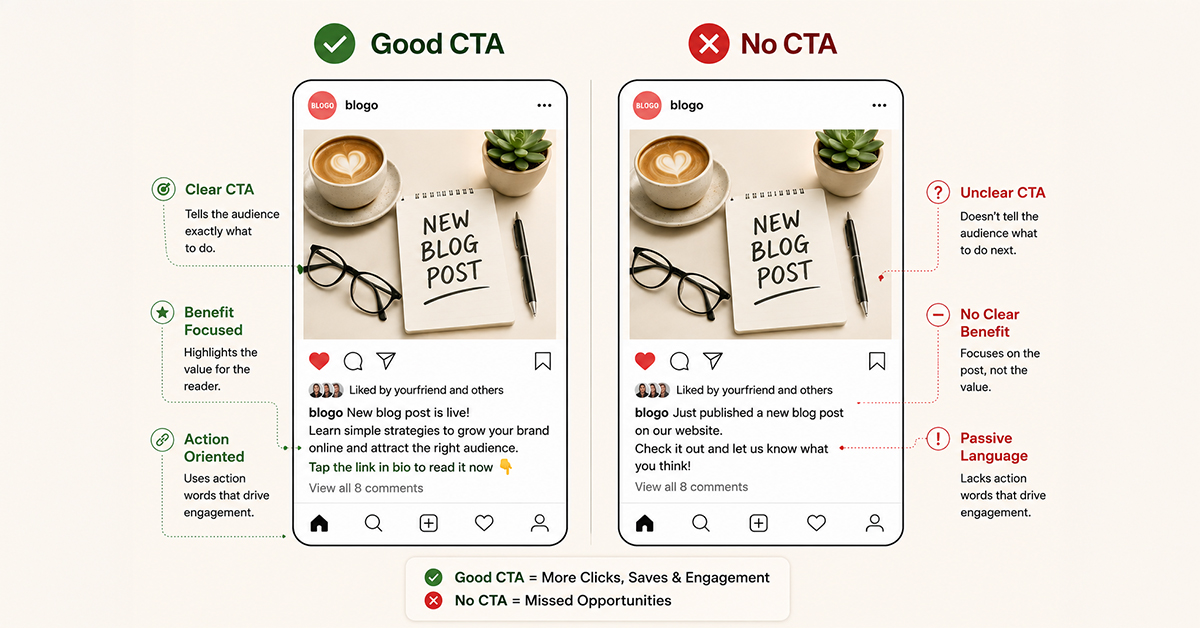
Include a Clear Call to Action
Many businesses spend time creating valuable content but forget to tell people what to do next. After reading your caption, your audience should have a clear next step. That doesn’t always mean asking them to buy something.
A call to action (CTA) can encourage different types of engagement depending on your goal.
If your goal is engagement
Ask your audience:
- What’s your opinion?
- Have you experienced this?
- Which option would you choose?
- Share your thoughts below
If your goal is education
Encourage people to:
- Save this post
- Share it with someone who needs it
- Follow your page for more tips
If your goal is lead generation
Invite people to:
- Visit your website
- Book a consultation
- Send you a message
- Contact your team
The key is keeping your CTA natural. Avoid making every caption sound like a sales pitch.
Keep Your Brand Voice Consistent
Imagine reading captions from the same company. One day the tone is professional. The next day it’s full of slang. A week later it sounds like a corporate press release. This inconsistency confuses your audience.
Your captions should reflect your brand personality. Whether your brand is friendly, professional, educational, or humorous, keep that tone consistent across every post.
Consistency builds familiarity. And familiarity builds trust.
Don’t Write for the Algorithm
Many people write captions hoping to “please the algorithm.” The reality is much simpler. Algorithms reward content that people engage with. People engage with content that feels useful, relatable, and interesting.
Instead of asking, “What does the algorithm want?” ask, “What would my audience genuinely enjoy reading?” If your audience finds value in your content, the algorithm is far more likely to reward it.
Should You Use Emojis?
Emojis can improve readability when used correctly. They help break up text and draw attention to important points. However, using too many emojis can make captions look cluttered and unprofessional. Use them only when they support your message. Like every marketing decision, moderation is key.
What About Hashtags?
Hashtags still help categorise your content, but they aren’t as powerful as they once were. Instead of adding thirty unrelated hashtags, focus on a small number of relevant ones, such as:
- Industry hashtags
- Service-specific hashtags
- Local hashtags
- Branded hashtags
Always prioritise relevance over quantity.
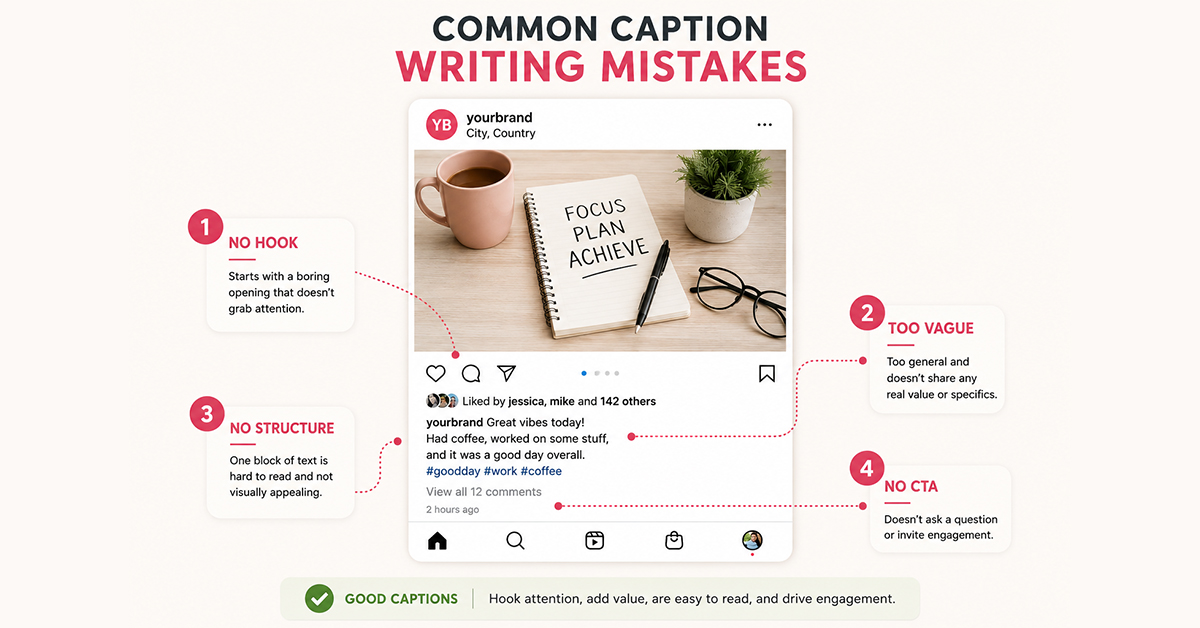
Common Caption Writing Mistakes
Starting With Boring Openings
Most captions begin with phrases like:
- We are excited to announce…
- Happy Monday…
- Welcome back…
These don’t create curiosity. Instead, begin with a problem, question, surprising fact, or bold statement that encourages people to continue reading.
Writing Everything in One Paragraph
Large blocks of text are difficult to read on mobile devices. Break your content into shorter paragraphs. This improves readability and keeps people engaged for longer.
Trying to Say Too Much
Every caption should communicate one main idea. Trying to cover multiple topics in a single caption often weakens your message. Keep it focused.
Forgetting the Audience
Many captions talk only about the business: “Our company…”, “Our services…”, “Our experience…”
Shift the focus toward your audience. Talk about their challenges, goals, and questions. People engage with content that feels relevant to them.
Final Thoughts
Great captions don’t need complicated words or clever tricks. They simply need to connect with the person reading them.
Start with an interesting hook. Focus on one clear message. Tell stories whenever possible. Write naturally. End with a meaningful call to action.
Over time, small improvements to your captions can lead to stronger engagement, more conversations, and better business results.
Frequently Asked Questions
How long should a social media caption be?
There isn’t a perfect length. Some posts perform well with a single sentence, while others benefit from detailed storytelling. The ideal length depends on your content and audience.
Should every social media post have a caption?
Yes. A caption provides context, tells the story behind your content, and encourages engagement. Even short captions can make your posts more effective.
What makes a good social media caption?
A strong caption usually includes an attention-grabbing hook, one clear message, valuable information, and a natural call to action.
Are long captions better than short captions?
Neither is automatically better. The goal is to write enough to communicate your message without adding unnecessary words.
Should I include hashtags in every caption?
Use hashtags when they’re relevant to your content and audience. Avoid adding large numbers of unrelated hashtags simply to increase reach.
Should every caption end with a call to action?
Whenever appropriate, yes. Encouraging your audience to comment, save, share, or contact your business helps increase engagement and guide readers toward the next step.
How do I make my captions more engaging?
Start with a strong hook, tell a story, ask questions, write conversationally, and focus on solving your audience’s problems rather than promoting your business.
Can AI help write social media captions?
Yes. AI can help generate ideas and create first drafts. However, captions should always be reviewed and personalised to match your brand’s voice and audience.
Should I use emojis in business captions?
Yes, but only when they improve readability or support your message. Avoid overusing emojis, especially for professional or B2B brands.
Why aren’t people reading my captions?
Common reasons include weak opening lines, long paragraphs, unclear messaging, or content that doesn’t address your audience’s interests or problems. Improving your hook and writing style can significantly increase engagement.